

After a couple of years of participating in local ham club ‘Fox Hunts’, I thought it would be fun to build and deploy a fox of my own. As a hunter, if I’m going to spend the time to ready the gear and drive to the ‘hunting ground’ (maybe 30+ minutes away), I’d like to have multiple foxes to track.
This past summer (2025), I assembled my own transmitter: “Steve” – an amateur radio beacon used for radio direction-finding (RDF) practice by hams in the northern Dallas Metroplex.
Operating Parameters
Operating Frequency: 433.750Mhz FM
Transmit Power: ~2W* (TxPwr = Medium)
Operating Hours:
– Saturday: 0800 – 1900 **
– Sunday: 0800 – 1900 **
Steve should be heard over a relatively wide area, given his transmit power. An attenuator will likely be helpful as you close in.
When you locate Steve, scan the QR Code on the box with your phone and complete the Fox Located form, including the CODE on the box – if provided. You will find his log at https://kc5jmd.net/fox-manager-log-steve
Location Guidelines
These are guidelines, not hard rules – as I may occasionally make exceptions for interesting sites or situations. As always – TRUST YOUR RADIO AND SKILLS.
- The general area of operation is:
- Primary Area – within the city limits of McKinney, TX
- Secondary Area – the eastern side of Prosper, TX (east of DNT)
- Other Possibilities – the McKinney border areas of Fairview, Frisco, and Melissa
- Steve *may* be visible from the car … or may require a short walk from a nearby parking area. No swimming or rock climbing will be required.
- Steve will only be on public or commercial properties – not on a residential property.
- Fenced-in areas and “No Trespassing” signs will be respected.
- Hospitals and Public Safety (police, fire) buildings and their grounds are off-limits.
- Elementary, Middle, and High Schools are acceptable locations, but only during non-school hours – weekends, school holidays, summer break.
- While he may be slightly obscured by vegetation or materials in the area, you will not have to open a container or door, or enter a building to find him.
Technical Details
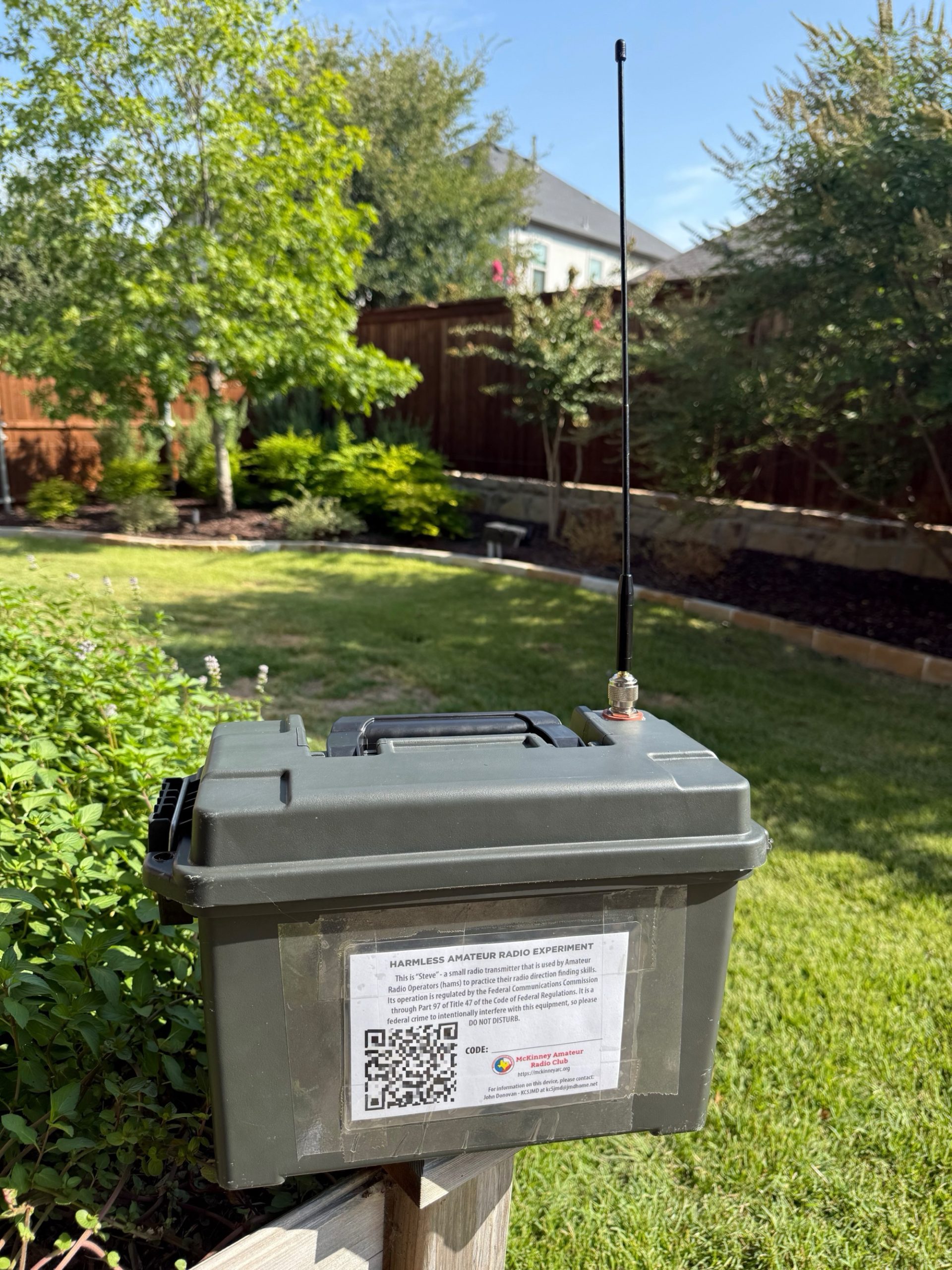
What’s in the Box
- Raspberry Pi 4B, 4Mb
- 32Gb SD Card drive
- DS3231 Real Time Clock module
- DS18B20 Temperature Sensor
- INA219 Voltage Sensor
- Raspberry Pi OS (Bookworm)
- QuanSheng UV-K6 Transceiver
- 40Ah LiFePO4 Battery
- 12/24v to USB-C 5A Converter (2)
- QuanSheng Battery Eliminator
- AiOC USB audio interface
- USB Galvanic Isolator
- External Antenna (various)
- Netgear LM1200 4G LTE modem
- Weatherproof container
The Software that drives him
Steve is controlled by a custom Python foxTalk2.py script running on the Pi. It uses the Piper Text-to-Speech (TTS) engine to generate voice messages, and each cycle includes:
- CW preamble (CQ call)
- Randomized content (a question/answer line from a pre-defined CSV file, read via the script)
- CW sign-off (callsign)
At approximately 00, 15, 30, and 45 minutes past the hour, Steve announces the time instead of the standard content. (NOT a WWV-standard time source)
The script manages PTT control, keying and releasing the mic for each cycle. Transmissions last about 30–35 seconds*.
Each cycle is delivered by the foxTalk2.py script being called by a cron task that is executed on 3 minute* intervals (:00, :03, :06, :09 …) between the hours defined above in the Operating Parameters. This provides the hunter with a known time to be listening for the fox throughout the hunt.
When the foxTalk2.py script isn’t transmitting its regular messages, the ‘foxtalk_listener’ process is listening to the radio’s audio output for specific DTMF tone sequences – including a start-of-transmission (SOT) sequence, passcode, command code and parameters, and end-of-transmission (EOT) sequence. We are still working through the early test phase of the ‘listener’ project – but the results are promising. Our plan is to allow hunters to get a status report from the fox and manually trigger a message cycle. Stay tuned.
Connectivity
Given that I don’t live in Steve’s primary ‘operating area’, I wanted a way to keep in-touch with the system and have an indication of whether he was still running. The RF side is a bit of a challenge given the distance, but the status of the power and Pi were relatively easy.
A low-cost ($25 on Amazon) Netgear LM1200 LTE cellular modem provides the gateway to the internet. It was simple to add to my mobile phone service plan ($10/month) and Steve was connected. With a full-time connection to the network, there are lots of things we can do.
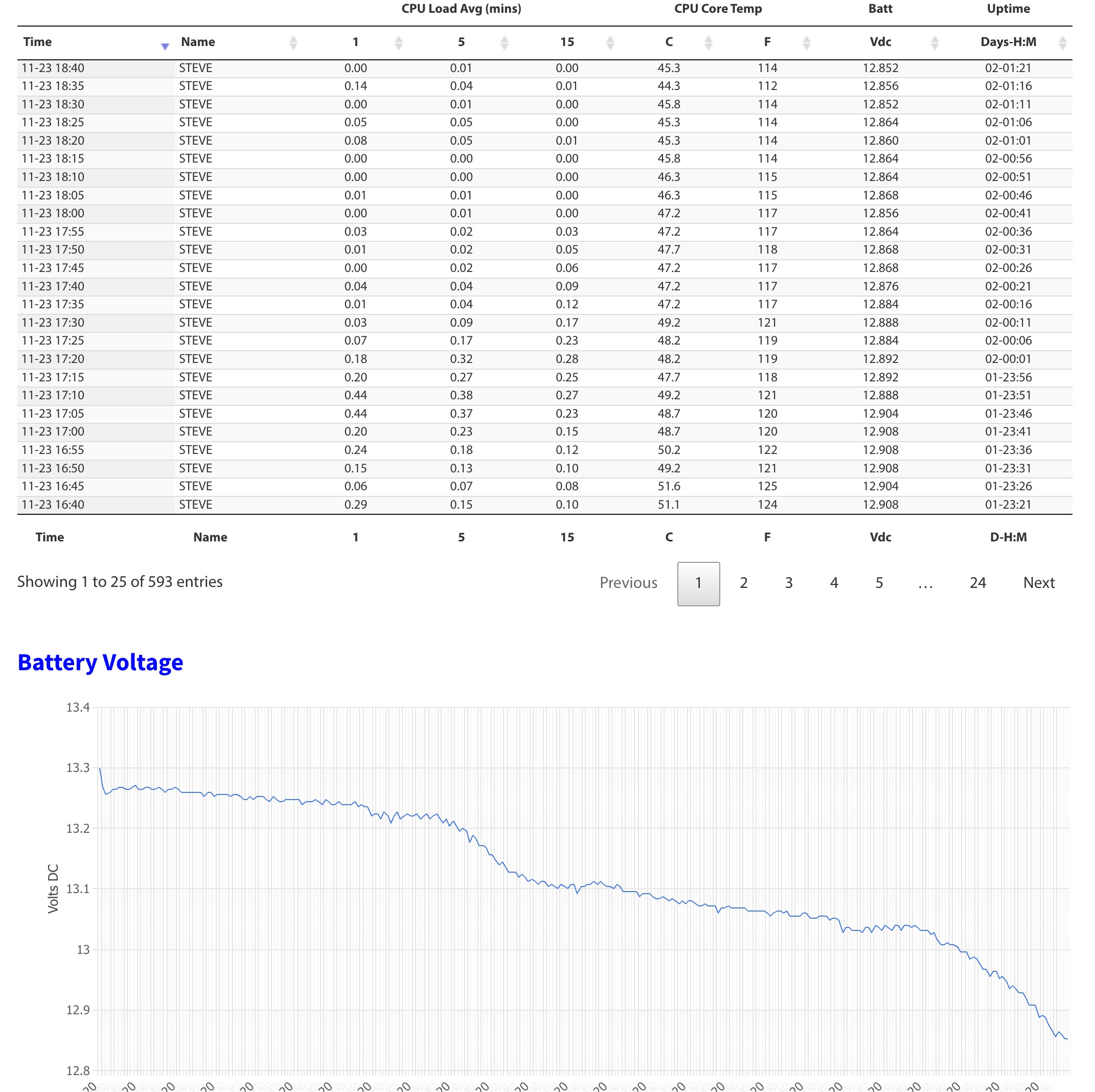
I wrote a simple ‘beacon’ script that sends a message back to a ‘listener’ application on my server every 5 minutes with the systemID, 5, 10 and 15 minute CPU load, core CPU temperature, enclosure interior temperature, and battery voltage from an INA219 voltage module on the Pi. An update is sent every 5 minutes and the data is stored in a database table … which is then used to produce a tabular report and battery voltage chart.
Remote access is accomplished by adding Steve’s Raspberry Pi to my TailScale VPN network, providing a static private IP address that I can connect to via SSH from any of my other TailScale-connected devices. Remote support, software updates, and system administration is easy to do from anywhere.
Questions?
Want to learn more or have a question? Leave a message on the Contact form and I’ll get back with you.
* – Subject to change and may vary
** – End times may be earlier to coincide with sun down.